
Consider a space S in which two or more versions are managed using Scroll Versions. This space may contain external links to content within it, absolute links to a page in S, potentially embedded in an email or bookmarked in a browser.
Suppose this space S has now been converted to Scroll Content Manager, as described here: Scroll Content Manager Conversion. As a result, a new space, SCM, now contains all the content originally held in space S.
Toward the end of this conversion process, internal links, links from other Confluence pages to content in space S, are migrated to point to the corresponding content in space SCM. However, this raises a question: what happens to the external link in your email that still points to a page in space S? That link should now point to the corresponding page in space SCM instead.
What happens to the link in your email to a page in space S?
This link to a page in space S should now point to the corresponding page in space SCM.
Since links located outside of Confluence cannot be updated automatically, the only viable option is to establish your own redirect mechanism.
-
Obtain the Page ID Mapping
Retrieve the mapping between the page IDs of source pages and their corresponding converted content (see below for details). -
Establish a Redirect Process
For example, if you access Confluence through a reverse proxy, you can implement the following redirect logic:-
Links to Page IDs
/pages/viewpage.action?pageId=0815 → /pages/viewpage.action?pageId=4711where
0815is the source page ID mapped to converted page ID4711. -
Tiny links
Tiny links must first be resolved to their corresponding page ID. This can be accomplished using a script such as the following:def tiny_to_page_id(tiny): return int.from_bytes(base64.b64decode(tiny.ljust(8,'A').replace('_','+').replace('-','/').encode()),byteorder='little')Example
/x/EIFE → EIFE → 4489488 → page ID mapped from source ID 4489488.
-
Redirect Will Break After Cloud Migration
Following a Cloud migration, these external (absolute) links will no longer be valid. This is not only because the domain portion of the URL changes, but also because page IDs differ between Data Center and Cloud — a page with ID I in Data Center will have a different page ID, IC, in Cloud.
Obtaining The Page ID Mapping
The mapping between source content in Scroll Versions- and/or Scroll Translations-enabled spaces and content in the converted space is stored per conversion, within the converted space itself (in this example, space SCM).
1. Retrieve Attachment ID
The page ID mapping is stored in an attachment associated with each conversion. To retrieve this attachment's ID, call the following REST endpoint for the converted space SCM:
<BASE_URL>/rest/api/space/<SPACE-KEY>/property/sv-documents-conversion?expand=value
This returns a response JSON object like:
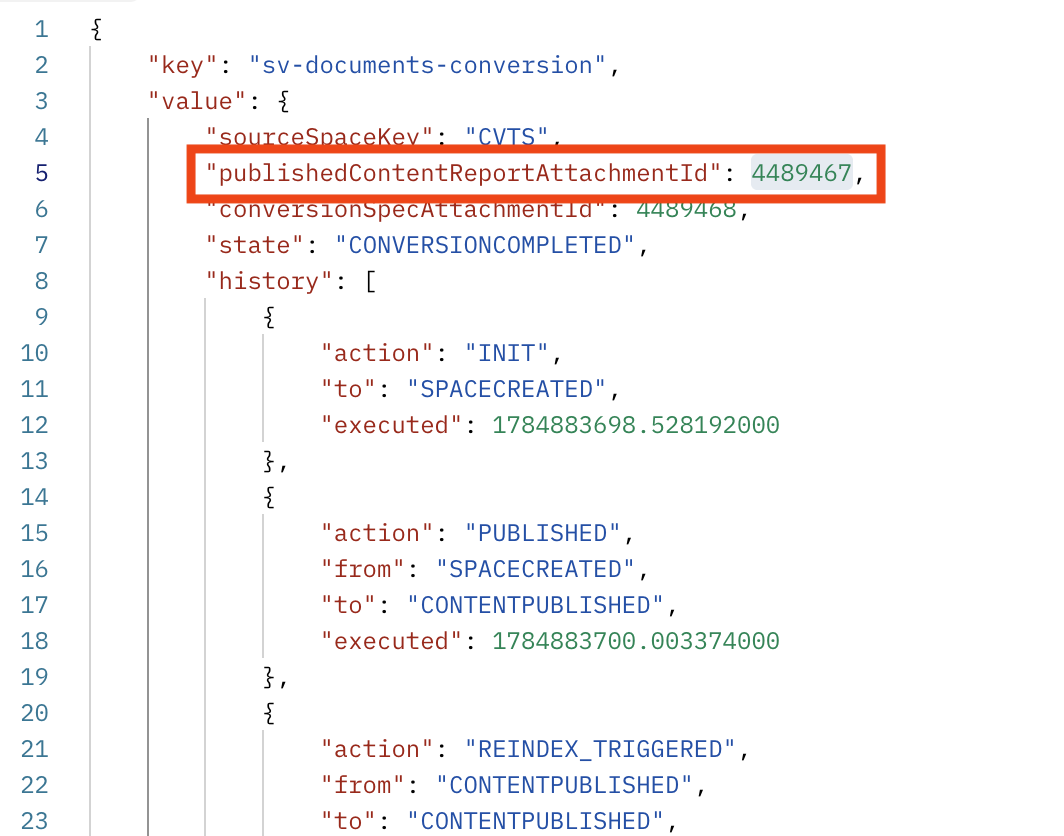
This response will include an attribute named publishedContentReportAttachmentId — in this example, 4489467. This is the attachment ID you will need in the next step.
2. Retrieve The Attachment Download Link
Using the attachment ID obtained above, call the following REST endpoint to retrieve a download link for the attachment:
<BASE_URL>/rest/api/content/<ATTACHMENT_ID>
This returns a response like
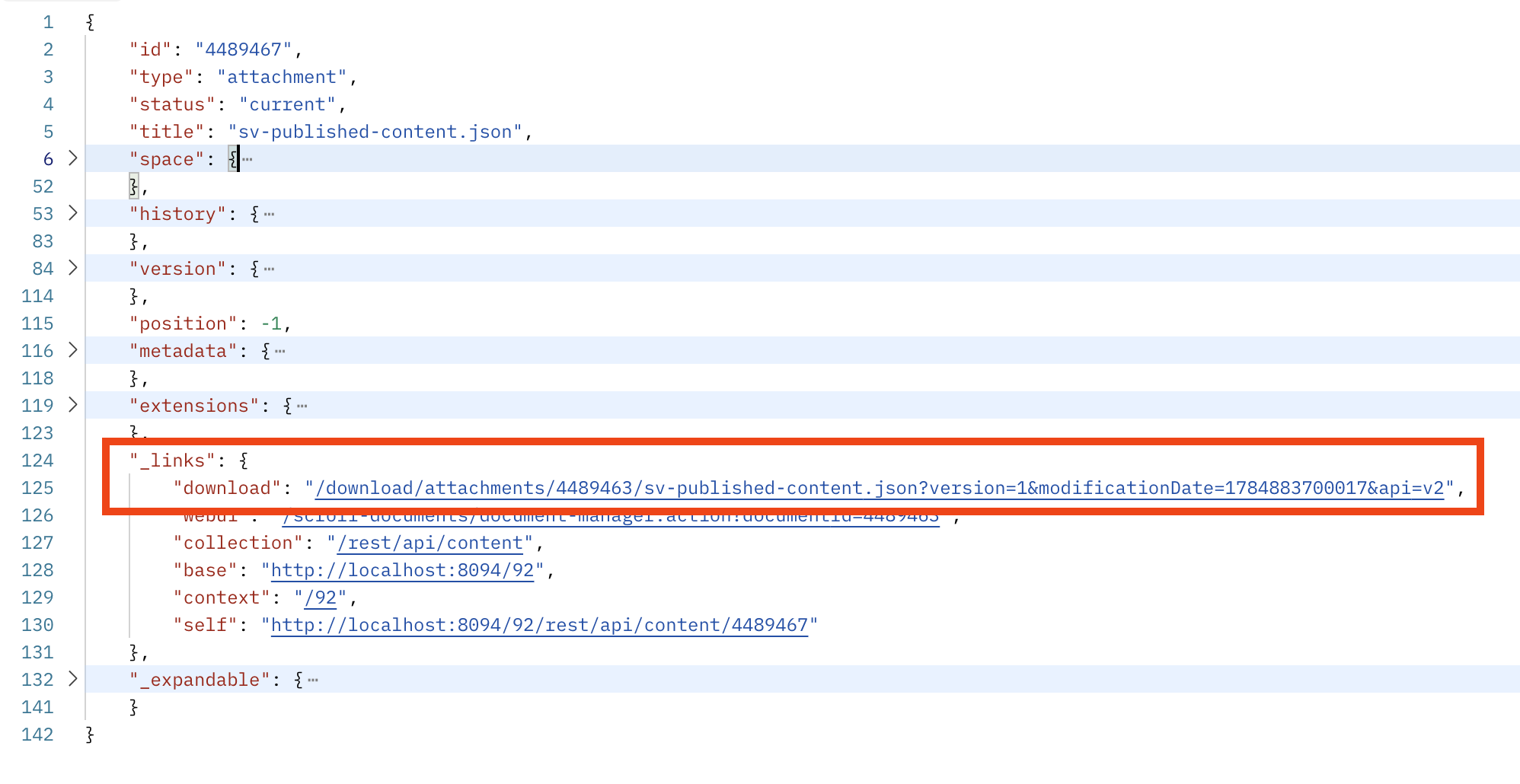
The attachment can then be downloaded by appending the _links.download value returned in the response to your base URL, for example:
<BASE_URL>/download/attachments/4489463/sv-published-content.json?version=1&modificationDate=1784883700017&api=v2
3. Open And Interpret The Attachment
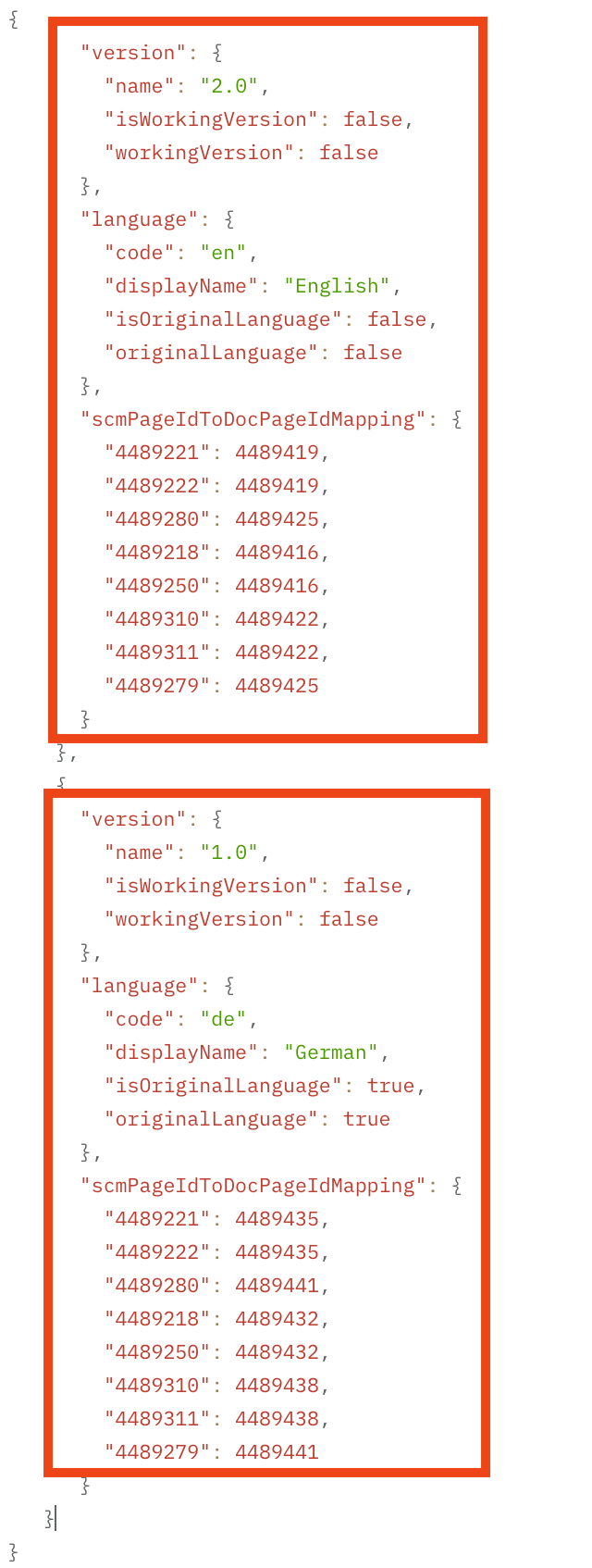
The downloaded attachment is a JSON file with the following structure:
Because Scroll Content Manager maintains a separate page for each version — and, where applicable, for each language within each version — you will find multiple page ID mappings stored within the scmPageIdToDocPageIdMapping attribute for each version/language combination.
The "left-hand" page ID represents the source page ID — that is, the ID of the page for the given version within the Scroll Versions- and/or Scroll Translations-enabled space (space S in the example above):
A 1:n Mapping Should Be Expected - Default Must Be Defined
In Scroll Versions- and/or Scroll Translations-enabled spaces, not every version necessarily has its own distinct page for a given piece of content: multiple versions may reference the same page if that content was not updated across those versions.
As a result, a single source page ID may map to multiple different converted page IDs within this mapping file.
When multiple languages are in use, this 1:n relationship applies to every page, since Scroll Versions- and/or Scroll Translations-enabled spaces manage all languages within a single page — unlike Scroll Content Manager, which manages each language on a separate page.
Consequently, you will need to determine a default version (and, where applicable, a default language) to use when resolving a source page ID that maps to multiple converted page IDs.